
Understanding [TCP Spurious Retransmissions] and [TCP Dup ACK] in Network Communication
Introduction
Network problems need to be diagnosed using .pcap traces. Traces can be taken from Start/Administration/Trace Analyzer. Specify the partner's IP address or hostname in the “field and select the desired start and end date to analyze traffic flows only for this period.
In TCP/IP networking, several key phenomena, including Spurious Retransmissions, TCP Duplicate Acknowledgements (DUP ACKs), and TCP Retransmissions play pivotal roles. Understanding these concepts is essential for diagnosing and improving network performance.
[TCP Retransmission]
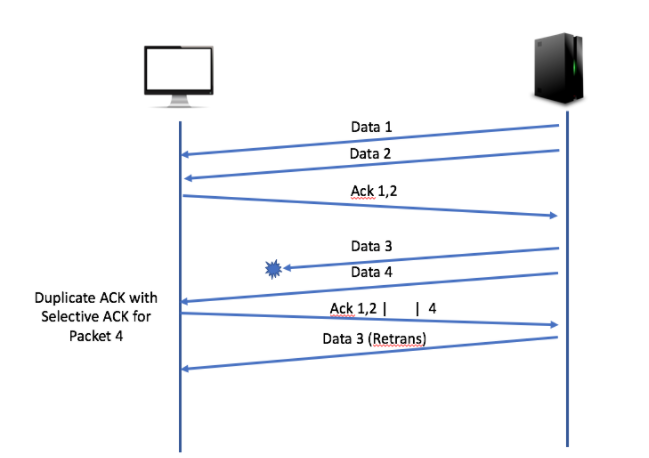
TCP Retransmissions are a fundamental mechanism of TCP to ensure reliable data transfer. When the sender does not receive an acknowledgment for a packet within a certain time frame, it assumes the packet was lost and retransmits it. This process is crucial in networks where packet loss is common, such as congested networks.
[TCP Spurious Retransmissions]
Spurious Retransmissions occur when a sender retransmits a packet, presuming it was lost, but the receiver had already received and acknowledged it. Tools like Wireshark flag these events as "[TCP Spurious Retransmission]."
[TCP Dup ACK]
[TCP Dup ACK] is sent by a receiver to indicate that a packet was received out of order and that it expects a different sequence number. This can be a sign of packet loss in the network. A series of Dup ACKs often prompts the sender to retransmit the missing packet.
Identification in Wireshark
Wireshark, a popular network protocol analyzer, flags these events as "[TCP Spurious Retransmission]." This tagging helps network analysts in identifying potential issues with network transmission and in tuning TCP/IP parameters for optimal performance.
If you have found these packets, you need to right-click on them and select: Follow/TCP stream or select the packet and use the default hotkey “CTRL+Alt+Shift+T”.
“Follow/TCP Stream” in Wireshark is a feature that allows users to view the entire conversation between two endpoints in a TCP session. It consolidates all packets exchanged in a single TCP connection and presents them in a readable format. This tool is particularly useful for analyzing the contents of a TCP session, understanding the sequence of communications, and troubleshooting network issues. It helps in identifying issues like missing packets, retransmissions, and understanding the flow of data in a session.
Example. Analysis of the Packets.
The example below shows three TCP packets, all marked as Spurious Retransmissions by Wireshark:
IP 223.XXX.XXX.6 (Sender)
- This address appears as the source of Spurious Retransmissions (for example, packets 317, 325, and 327). This indicates that the node 223.XXX.XXX.6 assumes its original packets were lost or unacknowledged and therefore retransmits them.
- These retransmissions could be due to network delays or incorrect configuration of the sender’s congestion control algorithm, which misinterprets delays as packet loss.
IP 62.XXX.XXX.162 (Receiver)
- This address sends Dup ACKs (for example, packets 318, 326, and 328), which is a normal response to receiving duplicate packets. Dup ACKs signify that the receiver has already received and acknowledged these packets, but for some reason, the sender is not recognizing these acknowledgments.
- Even though the receiver is sending acknowledgments, they apparently do not reach the sender, or the sender fails to process them correctly.
Who is experiencing problems?
It can be seen that the primary issue lies with the sender (223.XXX.XXX.6). This node continues to send retransmissions despite the fact that the receiver (62.XXX.XXX.162) is correctly sending acknowledgments. This could be related to issues on the sender's side, such as:
- Issues with network hardware or software that prevent proper processing of incoming acknowledgments.
- Possible delays or losses on the path from the receiver to the sender, hindering timely receipt of acknowledgments.
- Incorrect network settings, such as TCP Timeouts etc.
Conclusion
Thus, the analysis suggests that the main problem is associated with the node 223.XXX.XXX.6, which likely experiences difficulties in processing acknowledgments from 62.XXX.XXX.162.
What to do?
Resolving this issue will require further analysis on the sender's (223.XXX.XXX.6) side. In this case, the receiver's side (62.XXX.XXX.162) needs to contact the partner (223.XXX.XXX.6) to find out the reasons for this behavior of their node. In particular, it is necessary to provide the partner (223.XXX.XXX.6) with a trace where such issues are visible.
What to do if the problem side cannot be identified?
In this case, you can share both .pcap traces, taken from the recipient's side and on your side, with Alaris Support.
Let us remind you that traces can be captured using Start/Administration/Trace analyzer. In the Hostname field, specify your partner's IP address and pick the desired start/end date.
AKBSMS - Alaris Knowledge Base
Related Questions:
What is TCP Retransmission?
What is TCP Dup Ack?
What is TCP Spurious retransmission?
How to diagnose the network issues?
Link to this article: https://helpdesk.alarislabs.com/en/knowledge_base/article/234/category/131